OSINT Lens

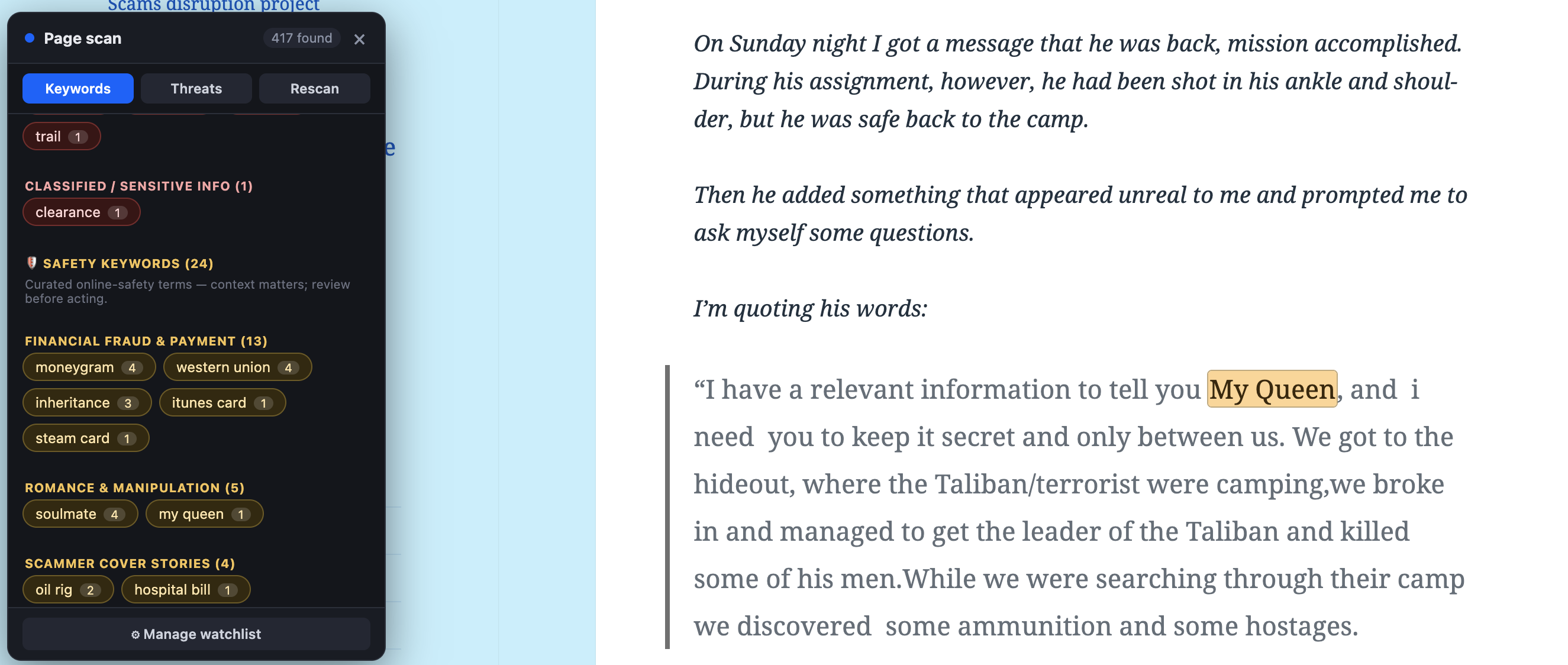
Recently, while digging through pages and pages of social media posts in search of threats, I had an idea. I decided to use Claude to vibe code a Chrome extension to help find the threats I was looking for more efficiently.
This Chrome extension is called OSINT Lens and here is how it can help.
How to trigger every OSINT Lens feature:
Start by selecting a name, username, email, or phone number on any page. You can launch a lookup three ways: click the floating 🔍 button, right-click and use the context menu, or open the toolbar popup and enter the identifier manually — all three run the same live lookup and pivot panel.
For a full-page sweep, click Scan whole page to detect every identifier at once as clickable chips. Use the panel's Keywords and Threats buttons to independently toggle highlighting for each result type. On slow-loading social feeds, hit ⤓ Deep to walk the scan down the page a screen at a time instead of missing content that hasn't rendered yet.
Two features are opt-in from Settings:
- Turn on Threat assessment before scanning to layer in the weighted risk-band analysis.
- Enable individual Safety keyword packs in Options to surface matches (like romance-scam or fraud language) under the Safety keywords section.
Add your own terms on the Options page to populate the ★ Watchlist section on every future scan, and toggle stealth mode in the popup any time you want to suppress live queries while still keeping manual pivot links usable.
Uncapped scanning, the full threat lexicon, and the premium safety packs unlock with the one-time $9 purchase via Settings → Get Premium.
If you. have any feedback, I would love to hear from you.