Profundis: Following the Connections Behind a Domain

Profundis: Following the Connections Behind a Domain
I enjoy learning about tools that help us take a small piece of information and find something useful. In OSINT, that starting point might be an email address, a username, or a domain.
A website can tell us quite a bit about a business, but there is also information behind that website worth exploring. Where is it hosted? What other domains share its infrastructure? Are there connections that deserve a closer look?
Profundis is a domain and infrastructure research tool designed to help answer those questions. It brings together host information, DNS records, certificates, and WHOIS observations, allowing researchers to follow connections between them.
What can you research?
Depending on your account access and the available records, you can use Profundis to:
- Find known subdomains associated with a domain.
- Review DNS records.
- Explore IP addresses, ports, and hosting network information.
- Search certificate information for related domain names.
- Research available WHOIS registration details.
- Find websites using visually similar favicons—the small icons displayed in browser tabs.
These searches provide possible directions for an investigation. For example, a domain found during business due diligence could lead to additional websites worth reviewing. A similar favicon could provide a lead when researching possible brand impersonation.
Those would be starting points for further research. They would still need to be checked.
Seeing the connections
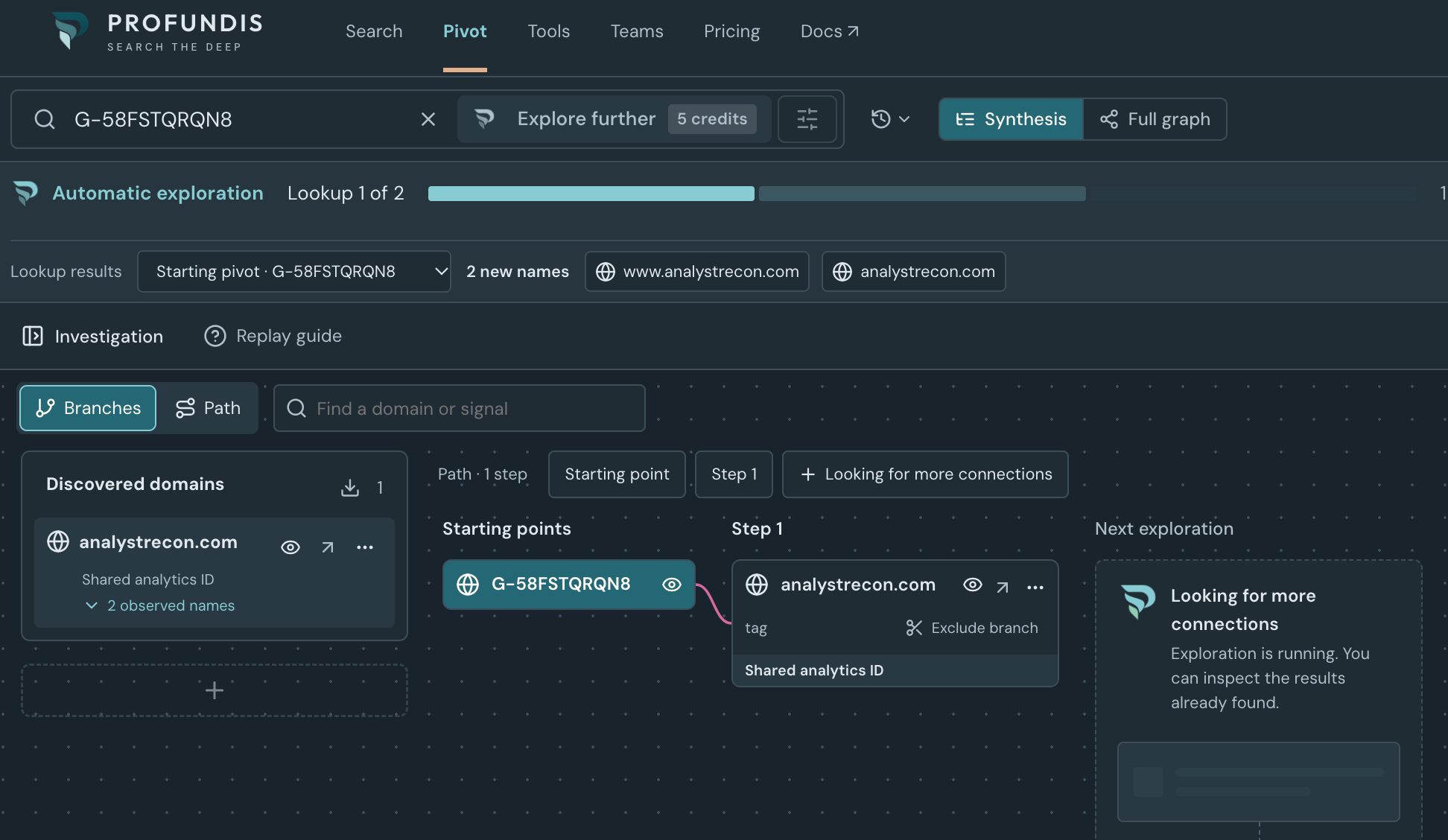
One feature that interests me is the Pivot graph.
You can begin with a domain, IP address, or supported favicon and explore the connections Profundis has observed. Selecting a node lets you inspect the supporting relationships and continue your research from there. Signals can include shared addresses, certificates, tracking identifiers, and registration information.
I like the idea of being able to see how one finding connects to another. It can make a complicated set of results easier to follow and help identify which lead to examine next.
There is an important distinction here, though. Two websites sharing an IP address does not establish that the same person owns them. Shared hosting and common website components can create connections between unrelated sites. Profundis also explains that its observations may have different dates and incomplete coverage.
How does it integrate with AI?
This is another part of Profundis that I found interesting.
Profundis offers an MCP server. MCP stands for Model Context Protocol, which gives compatible AI assistants a way to access external tools and retrieve information.
Rather than copying search results into an AI conversation, a connected assistant can request information through Profundis’s tools. Its documentation includes connection guidance for Claude, Claude Code, ChatGPT, and other compatible clients. Availability depends on the client, plan, and workspace settings.
A practical workflow I would explore is asking the assistant to gather a limited set of domain records, organize the findings, and identify questions that need further research.
For example:
“Research example.com using Profundis. Find its known subdomains, review the available DNS records, and summarize possible infrastructure connections. Include the supporting records and observation dates where available. Separate confirmed observations from assumptions, and ask before expanding the research.”
That is an example prompt, rather than a workflow I have personally tested. What I like about it, is having help organizing the information while keeping the supporting evidence available for review.
The connection uses https://mcp.profundis.io. Profundis supports OAuth authentication, with API keys available for scripts and compatible headless clients. MCP access requires an eligible paid plan or unused purchased credits; the monthly free credits alone do not qualify. Tool calls consume Profundis credits.
Getting started
Profundis currently offers a free account with 25 monthly credits for exploring its core search features. Paid subscriptions and one-time credit packs provide additional capacity and access. Check the pricing page before planning a larger workflow.
I would start with a domain I own or know well. Having some familiarity with the website would make it easier to understand the results and recognize which connections are useful.
Tools like this give us more ways to follow a lead. Taking time to understand the records, document our steps, and verify our conclusions is still what makes the research valuable.
Have you used Profundis, or connected a domain research tool to an AI assistant? I would enjoy hearing how you are using it.